7/20/07

Save your FireFox Sessions with Session Manager 0.5.4


Save your Firefox sessions with Session Manager whenever you want or automatically at the Startup and after crashes.

Save your browsing sessions so that you can get back to work straight away when you come online saving you from the routine of opening all the tabs and windows, it has the ability to reopen accidentally closed windows and tabs,It's a pretty useful tool for those who do a lot of research work on the web.

If you use a dual boot system you can make Firefox to save your sessions in a common location which is readable by both the operating systems, that way you can get back to work right away which ever operating system you are on.

Get it here:Session Manager 0.5.4

Edit: get the latest version here.

7/16/07

Logitech take's mouse of pad into air


Logitech Launches a exciting new wireless rechargeable mouse called MX Air, what is so special about it? well you can actually use it in the air to control the cursor on your pc ,which reminds me of the Nintendo's Wii game controller.

You can hold it in your hand like a remote controller of your tv (it's more accurate to compare it with the Nintendo Wii) and use the Gesture controls to flip through images on your computer or reduce or increase the volume by press holding the volume button and moving your hand to the right to increase volume and left to decrease the volume and skip a song during you listen to music by flipping your mouse in a circular motion to the right or repeat a song by flipping your wrist to the left, the scroll wheel on the mouse is replaced by a touch sensitive scroll panel which responds to the finger swipes on it and it has a operating range of 30 feet which is good enough to use it by laying down on your sofa in the living room.

Check out the official Logitech MX Air video:

7/13/07

Firefox Download Statusbar.


Integrate the Firefox Download window directly into your browser as a Statusbar with the following Firefox Addon.It makes your downloads clean and easily manageable right from your browser window.

Manage and track your downloads while you browse,just move over your mouse over the download status bar for additional information about the file you are downloading or get the preview of the image file you have downloaded.

Despite its compact size, Download statusbar packs in more useful features than the standard download window. The fully customizable interface auto-hides when not in use, allowing full control without interruption.

Get :Download Statusbar 0.9.6.3 here

7/8/07

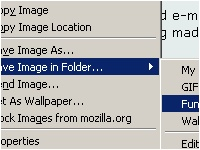
Save images into specific folders with the following Addon for Firefox.


Organize your images easily into specific folders while you download them, saving a lot on your time and effort.You can Send them into your favorite folders with just a few clicks once you configure the addon without going through the time consuming default Save Image As folder structure, right from the contextual menu.


Double clicking on a Image in a web page would save the image in the folder that was last used by the addon without going through the contextual menu again.
You can even set it to overwrite a file with similar filename or increment the file name with a number and save it when there are files in that folder with a similar file name.

Link:Save Image in Folder 1.1.3

7/7/07

Animation Vs Animator.

Came across this really Cool and hilarious video on Youtube.

Tech-Sesnei Recent Posts