7/7/07

Add Colors and Cool Feautres with the Gmail Skins addon for Firefox.


Change the way your gmail looks and add some cool features to your gmail with the gmail skins addon for Firefox.
https://addons.mozilla.org/en-US/firefox/addon/2127
you can change the color of your inbox and Integrate your google homepage alongside your inbox. the addon promises many more features like:

allowing you to view weather reports, rss feeds, news headlines, flickr recently added, google calendar module etc from your inbox.
* Easily insert images from your Picasa web album in to your emails
* Insert smileys/emoticons and images in to your emails.
* Insert HTML tables and other complex HTML in to your emails.
* Make the navigation (Inbox, Starred, Sent Mail, etc) horizontal.
* Fix the navigation in place so that you don't have to scroll to the top of the page to see it.
* Zebra stripes on mailbox - pretty!
* Change the attachment paperclip (on inbox) to an icon indicating the type of attachment.
* Hide various page elements (invite panel, page footer, your email address from the top right of inbox).

The addon has some minor bugs like the disappearing of the gmail skins settings tab once you navigate away from the tab.

There is a temporary fix for this:
When ever you want to change the settings,
Go to your gmail Settings >> Labels.
Remove the one named gmskin.
Press F5 or reload and You should have the option to reset your skin and the settings.

6/30/07

Some not so well known but greatly useful Google tips.

You can use google to do some quick calculations while online or whenever you require by typing them into the search bar and hitting enter.

eg: 123456*123-789+123/456

The following tip is very useful to students.You can get the definition of any word that you don't know by typing them in the search bar with an advanced operator "define:".

eg: "define:wow" type it without the qoutes.


Want to know about the important events between the year 1940..1945, just type 1940..1945 (periods) and hit search, you can use this type of search anywhere where there are a number series.

Don't remember the exact words of a saying, a song or for instance newtons third law, google can help you out with it, just enter the words that you remember and enter a
wild card character"*" where you don't remember the words in the searchbar and hit enter.

Eg:newton for each and every action*

Happy Blogging.

6/29/07

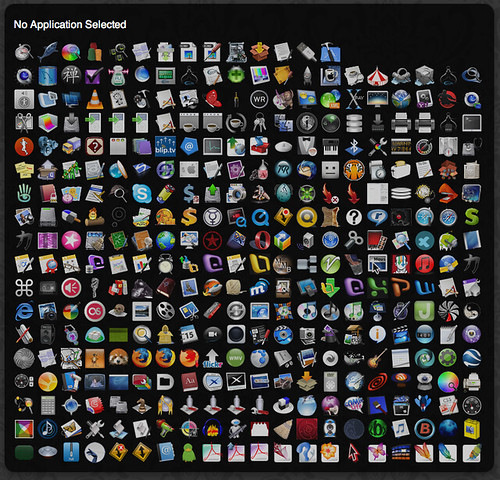
Todo


Todos, originally uploaded by factoryjoe.

Came across this very Interesting image on flickr, this image was created using an application called Todo, which is an Mac OSX application that displays all the applications on a computer in a window.

6/23/07

Tips to use Google Like a Pro. (Edited)

File sharing services like Rapidshare,Megaupload,Sendspace etc....... are a great place to find whatever stuff we are looking for but unfortunately these sites do not index the content that is stored on their servers for search but we can still search them using Google's search engine by adding advanced operators to the search string.

For Instance if you want to search for a file on Rapidshare all you need to do is to go to google and type the following without the quotes "site:rapidshare.com" or if you want to search Megaupload.com replace rapidshare.com with megaupload.com "site:megaupload.com" with the name of the file you want to search.

additionally you can also use the advanced operator "inurl" to search for files as rapidshare url consists of the file name:

For Music:
google: +inurl:wma|mp3|ogg site:rapidshare.com "file name"


For video files:

google: +inurl:avi|mpg|wmv| site:rapidshare.com


To see all archives and programs available...

google: +inurl:exe|rar|zip site:rapidshare.com


This will give you all files available...

google: .* site:rapidshare.com

Since most files are uploaded after being zipped searching for them with:

google: +inurl:rar|zip site:rapidshare.com will give you more results.


You can also search Torrents using google just type "filetype:torrent followed by the name of the file you want to search for, here is an example of a search that I made:


Happy Browsing.

6/17/07

Ways to Make Firefox Go Lite on your system resources.

You can force Firefox to use a prefixed amount of your system memory(Ram) by the following tweak:

Type "about:config" in the browser address bar without the quotes and in the filter type “browser.cache” and search for “browser.cache.disk.capacity"


The default is set to 50000, right click on it and select modify


but you can change it , depending on how much memory you have on your computer or how much you want assign to. go for a number around 20000 if you have more than 512MB of ram on your PC.


Reduce RAM usage further for when Firefox is minimized. This setting will move Firefox to your hard drive when you minimize it, taking up much less memory. And there is no noticeable difference in speed when you restore Firefox, so it’s definitely worth a go.

Type "about:config" in the browser address bar without the quotes


Right click anywhere and click on New-> Boolean


Name it “config.trim_on_minimize” without the qoutes.


Toggle it to TRUE and restart Firefox for the settings to take effect.


HAPPY BROWSING.

Tech-Sesnei Recent Posts